Single Property (Modern)
Setup Single Property Page with Elementor in Modern
With the release of v4.5.3, RealHomes provides full support for designing and applying Elementor-based templates to single property pages in the Modern design. You can import pre-designed single property templates or build your own custom layout from scratch.
⚙️ Configure the Template Settings
To apply a template globally to all property detail pages:
RealHomes Settings
- Navigate to Dashboard ➤ RealHomes ➤ Settings ➤ Property Detail Page ➤ Basic.
- From the Elementor Single Property Template select dropdown, choose your desired template.
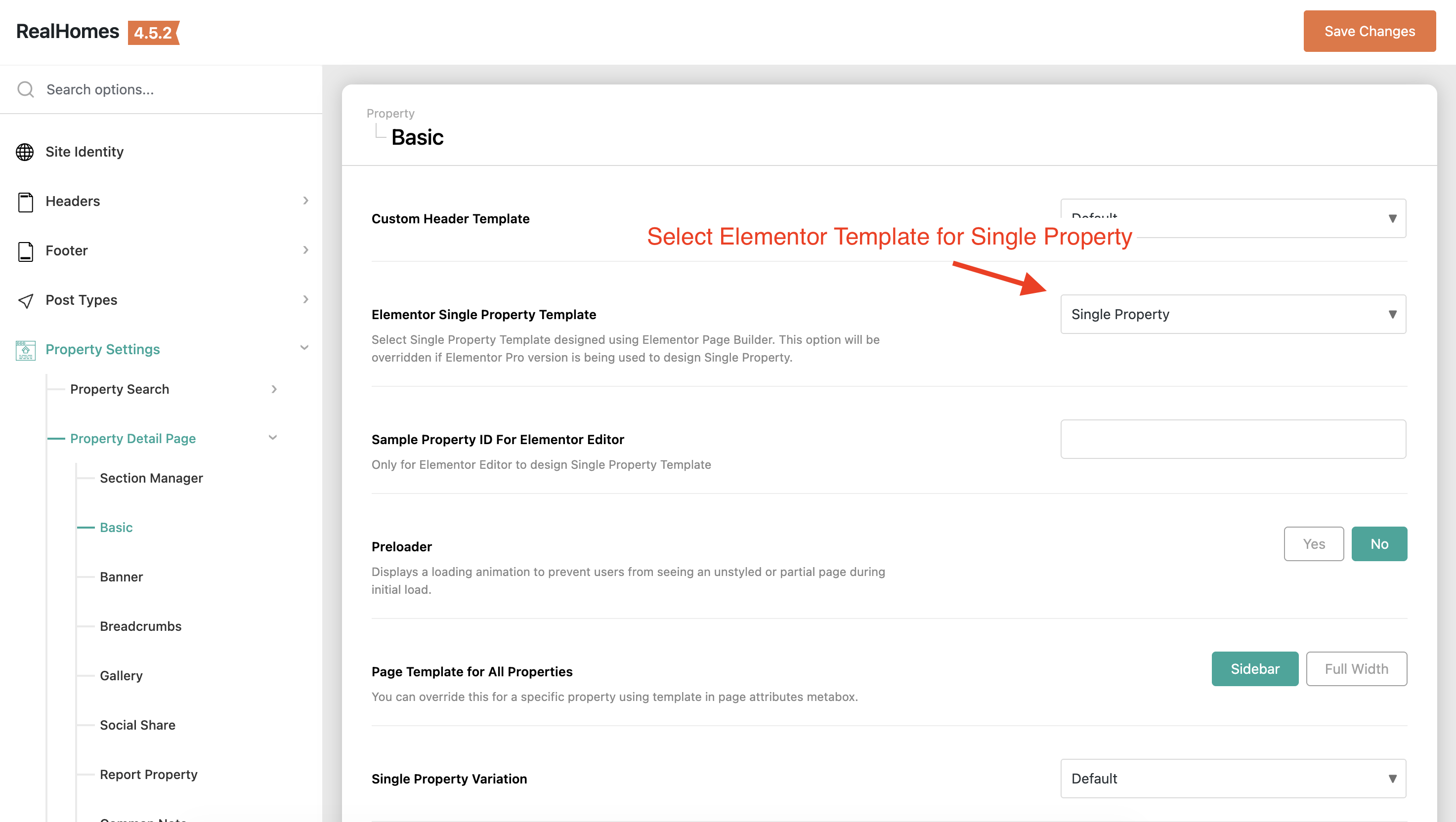
- In the Sample Property ID for Elementor Editor field, enter the post ID of a published property to serve as a preview.
📌 Note: Some RealHomes widgets are dynamic and may not fully render within the Elementor editor. To verify changes, save your layout and preview a property page on the frontend.
🔄 Overriding Templates on a Per-Property Basis
You can assign different Elementor templates to individual properties using the property edit screen:
- Edit a property under Dashboard ➤ Properties ➤ All Properties.
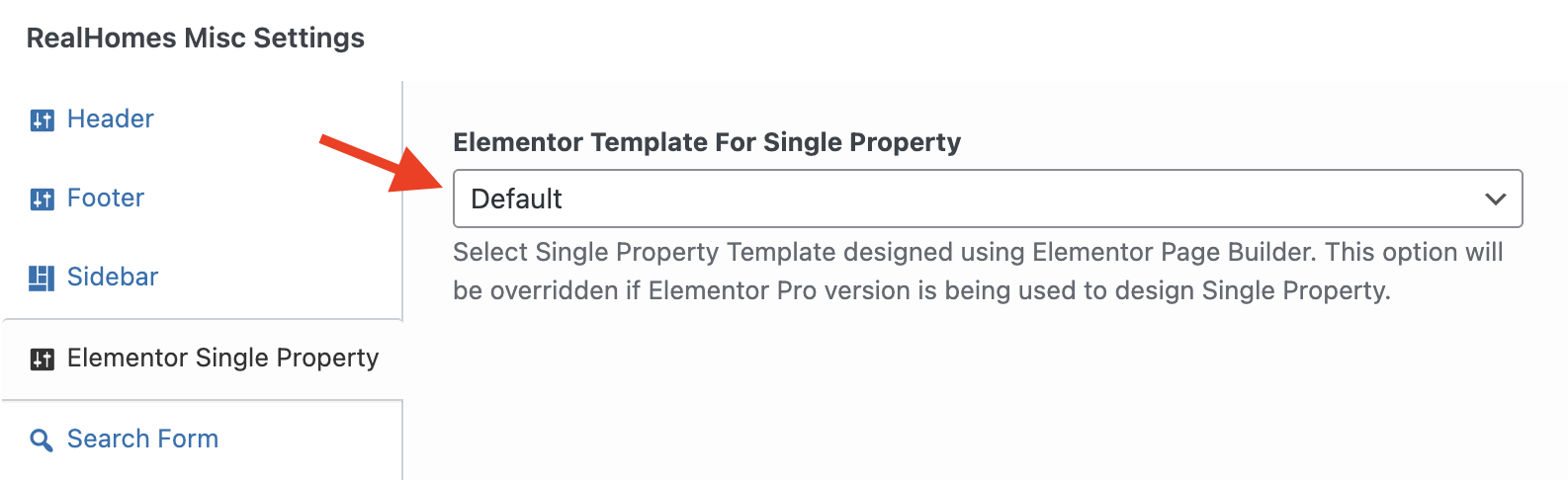
- Scroll down to the RealHomes Misc Settings meta box and select the Elementor Single Property tab.
- Choose the specific template under the Elementor Template For Single Property dropdown.
✏️ Design Your Own Single Property Layout
If you prefer to design a custom template from scratch, you can register a new template in the Elementor Library and compose it using the dedicated RealHomes Single Property widgets.
Available Modern (V2) Widgets
When editing single property templates in Elementor, look under the RealHomes Ultra Single Property widgets category (or search for V2 or RH:) to find the following custom Modern widgets:
- RH: Single Property Meta V2 — Displays rooms, baths, garages, area, lot size, etc.
- RH: Single Property Description V2 — Renders the main property description content.
- RH: Single Property Additional Details V2 — Lists custom key-value details of the property.
- RH: Single Property Features V2 — Lists checked features/amenities.
- RH: Single Property Map V2 — Integrates Google Maps, OpenStreetMap, or Mapbox.
- RH: Single Property Video V2 — Embeds property video tours.
- RH: Single Property Virtual Tour V2 — Renders 360-degree virtual tours.
- RH: Single Property Floor Plans (V2, V3, V4) — Displays interactive floor plans.
- RH: Single Property Attachments V2 — Provides downloadable file attachments.
- RH: Single Property Common Note V2 — Displays disclaimer or notes.
- RH: Single Property Similar Properties V2 — Shows related properties.
- RH: Single Property Agent V2 — Displays assigned agent details.
- RH: Single Property Agency V2 — Displays assigned agency details.
- RH: Single Property Schedule Tour V2 — Integrates tour scheduling contact forms.
- RH: Single Property Mortgage Calculator V2 — Financial calculation widget.
- RH: Comments V2 — Renders WordPress comments for the property.
🛠️ Developer Reference
Under the hood, RealHomes queries the global template setting using the WordPress core function get_option() and specific property overrides via get_post_meta().
The theme conditional loader in assets/modern/partials/property/single.php uses do_action() to trigger the following action hook to output the Elementor template content:
do_action( 'realhomes_elementor_single_property_content' );