OTP (One-Time Password) Verification Setup
RealHomes provides built-in support for OTP (One-Time Password) verification, which enhances security by requiring users to enter a code sent to their registered email during the login process.
1. Enabling and Configuring OTP
To configure the OTP functional settings, follow the navigation path based on your version of the RealHomes theme:
RealHomes Settings
➤ ➤ ➤ ➤
Legacy Settings
➤ ➤ ➤
Configuration Steps:
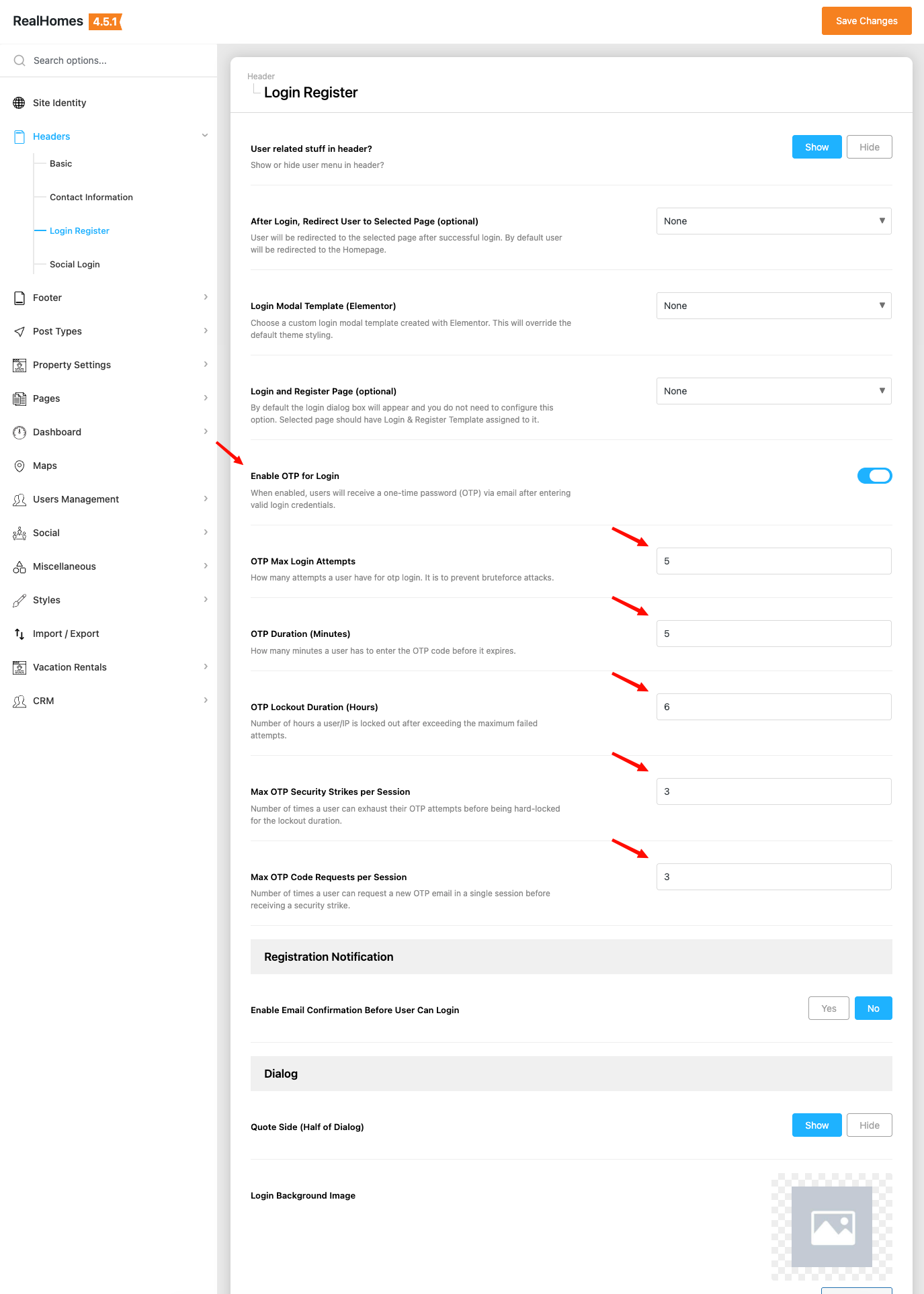
- Scroll to the bottom of the page to find the OTP Settings.
- Enable OTP for Login: Turn this toggle ON.
- OTP Max Login Attempts: Set the maximum number of incorrect attempts allowed.
- OTP Duration (Minutes): Define the validity lifespan of the OTP code (max 10 minutes).
- Click Save Changes to apply.
2. Creating an OTP Page (Required for Social Login)
If you are using the Social Login feature, you must create a dedicated page for users to enter their OTP.
- Navigate to Pages → Add New.
- Title the page (e.g., OTP Verification).
- Under Page Attributes, select OTP Verification from the Template dropdown.
- Click Publish.
- Note: Ensure permalinks are set to Post name under Settings → Permalinks.
3. Configuring OTP Settings in Customizer (For Social Login)
Assign the OTP page in the Customizer:
- Go to Appearance → Customize → Header → Login & Register.
- Locate the Select OTP Page dropdown.
- Select your created OTP Verification page.
- Click Publish.
4. Security & Brute-Force Protection
RealHomes includes a robust 3-Strike OTP Exhaustion Policy that protects accounts from automated brute-force attacks while remaining forgiving to typos by legitimate users.
- The Session (5 Attempts): A user is granted 5 attempts (adjustable using the Max Login Attempts setting) to correctly enter a single 6-digit OTP code before that specific code is invalidated.
- The Tolerance (Strikes 1 & 2): If a user exhausts their attempts, the current OTP is destroyed, and the user receives a "Strike". They are then prompted to request a brand new OTP via email to try again.
- The Hard Block (Strike 3): If a user exhausts their session three separate times consecutively (e.g., 15 total incorrect guesses), the system assumes a malicious attack and triggers a Hard Block:
- The user's account and the attacker's IP address are locked out of the OTP system for 6 hours.
- During this 6-hour window, no new OTP emails can be requested.
- The Clean Slate: If a user successfully verifies a correct OTP at any point before Strike 3, the system performs a full clear of all failed attempts, strikes, and IP trackers.